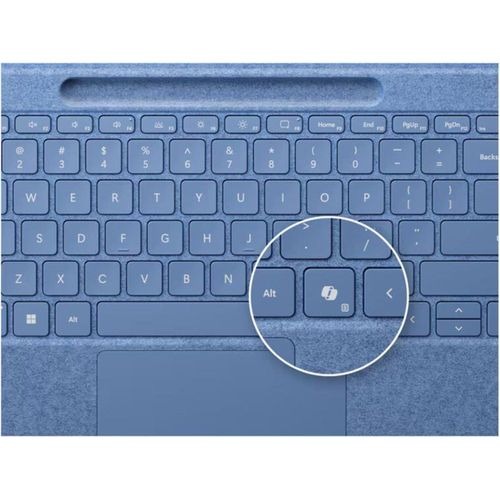
The Microsoft Surface Pro Keyboard is a premium detachable keyboard designed to transform a compatible Microsoft Surface Pro tablet into a more traditional laptop-style workstation. This version is supplied without the Surface Slim Pen, making it a suitable choice for customers who already own a compatible Surface Pro device and want the keyboard separately.
Designed for productivity, portability, and comfortable everyday use, the Surface Pro Keyboard provides a full keyboard layout, precision glass touchpad, dedicated function keys, Windows shortcuts, media controls, screen brightness controls, and a dedicated Copilot key. It connects directly to compatible Surface Pro devices using the built-in magnetic connector, allowing users to attach or remove the keyboard quickly without cables or complicated setup.
The keyboard is designed to provide a comfortable typing experience while maintaining the slim and portable profile associated with Surface Pro devices. When attached to a compatible Surface Pro, it allows the tablet to function more like a conventional laptop, making it suitable for office work, schoolwork, business tasks, web browsing, document creation, email, presentations, and general computing.
One of the main features of the Surface Pro Keyboard is its glass touchpad. The precision touchpad provides a smooth surface for navigation, allowing users to move the pointer, select items, scroll through documents, and use supported Windows gestures without needing a separate mouse.
The keyboard includes a complete row of function keys from F1 through F12. It also provides dedicated keys for common Windows functions, media controls, screen brightness, and other frequently used commands. This gives users quick access to important functions without having to navigate through Windows menus.
A dedicated Copilot key is included on current Surface Pro keyboard versions. Depending on the Windows configuration and availability of Copilot on the connected device, pressing the Copilot key can open Copilot or Windows Search.
The keyboard is particularly useful for professionals who need to work on a Surface Pro while travelling. Instead of carrying a separate laptop, users can attach the keyboard to their Surface Pro and use the device for typing emails, creating documents, preparing presentations, working with spreadsheets, browsing websites, and handling other productivity tasks.
Students can also use the Surface Pro Keyboard for assignments, research, note-taking, online learning, presentations, and document creation. The integrated touchpad means a separate mouse is not required for basic navigation.
For business users, the keyboard provides a convenient way to turn a compatible Surface Pro into a portable productivity workstation. It is suitable for meetings, presentations, office applications, remote work, customer visits, and travelling between different locations.
The keyboard attaches magnetically to the Surface Pro. To connect it, the bottom edge of the Surface Pro is brought close to the top edge of the keyboard until the magnetic connectors click into position. The keyboard can then be detached by pulling the two components apart.
The magnetic connection provides a clean setup without requiring cables between the keyboard and Surface Pro. It also allows users to quickly switch between tablet-style and keyboard-enabled use.
When finished using the Surface Pro, the keyboard can be folded over the front of the device to help protect the screen and put the Surface into sleep mode. Opening the keyboard allows the Surface Pro to be used again.
The Surface Pro Keyboard is also designed to be portable. Its slim form factor makes it easy to carry with a Surface Pro in a laptop bag, backpack, briefcase, or other travel bag.
This keyboard is compatible with several Surface Pro generations. Microsoft lists compatibility with Surface Pro 11th Edition, Surface Pro 10 for Business, Surface Pro 9, Surface Pro 8, and Surface Pro X for the Surface Pro 13-inch Keyboard.
Customers should check the exact Surface Pro model before purchasing because Microsoft also offers a separate keyboard specifically designed for the newer Surface Pro 12-inch. The Surface Pro 12-inch Keyboard is not interchangeable with the 13-inch Surface Pro keyboard family.
The keyboard provides a useful combination of portability and functionality. When attached to a Surface Pro, it creates a laptop-like configuration while retaining the ability to detach the keyboard whenever the user wants to operate the device as a tablet.
For users who frequently switch between typing and touch-based interaction, this flexibility can be particularly useful. Documents can be typed using the physical keyboard, while touch interaction can be used directly on the Surface Pro display when appropriate.