The Microsoft Surface Pro 12-inch Keyboard with Slim Pen is a premium detachable keyboard and digital pen bundle designed specifically for the Microsoft Surface Pro 12-inch. It combines a full-size backlit keyboard, precision touchpad, flexible 360-degree dynamic hinge, dedicated Windows and productivity controls, and the Surface Slim Pen 2 to provide a versatile setup for work, study, creativity, note-taking, and everyday computing.
Designed exclusively for the Surface Pro 12-inch, this keyboard attaches magnetically to the device and transforms the tablet into a laptop-style workstation. Microsoft specifically states that the Surface Pro 12-inch is compatible with the Surface Pro 12-inch Keyboard, while keyboards designed for the 13-inch Surface Pro models are not compatible with the 12-inch model.
The bundle includes the Surface Pro 12-inch Keyboard and Surface Slim Pen 2. The Slim Pen 2 provides a precise digital writing and drawing experience, making the bundle suitable for customers who want more than conventional keyboard input. Microsoft specifies 4,096 pressure levels, zero-force inking, tilt support, Bluetooth connectivity, and haptic feedback compatibility for the Surface Slim Pen 2 when used with supported devices and software.
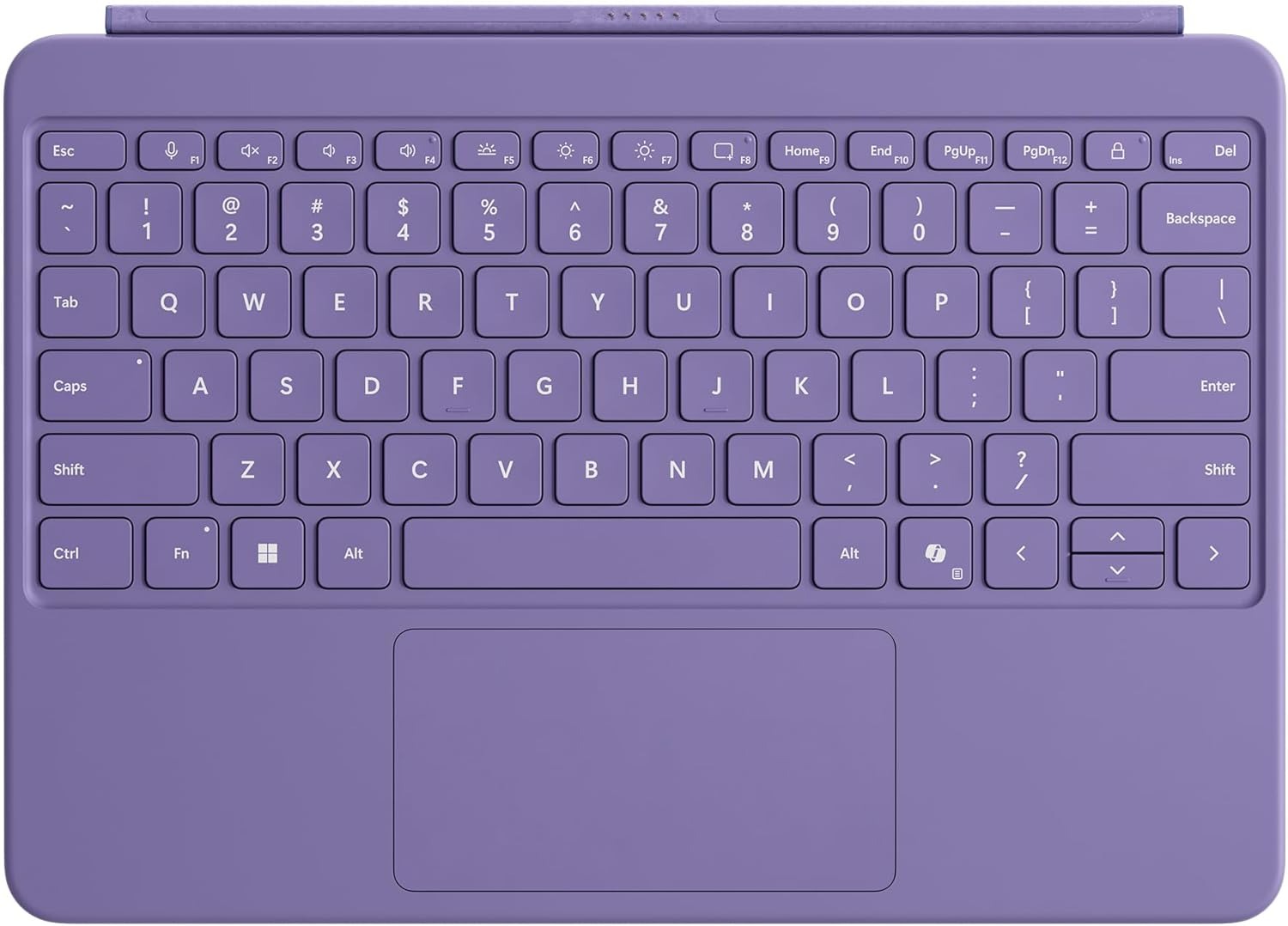
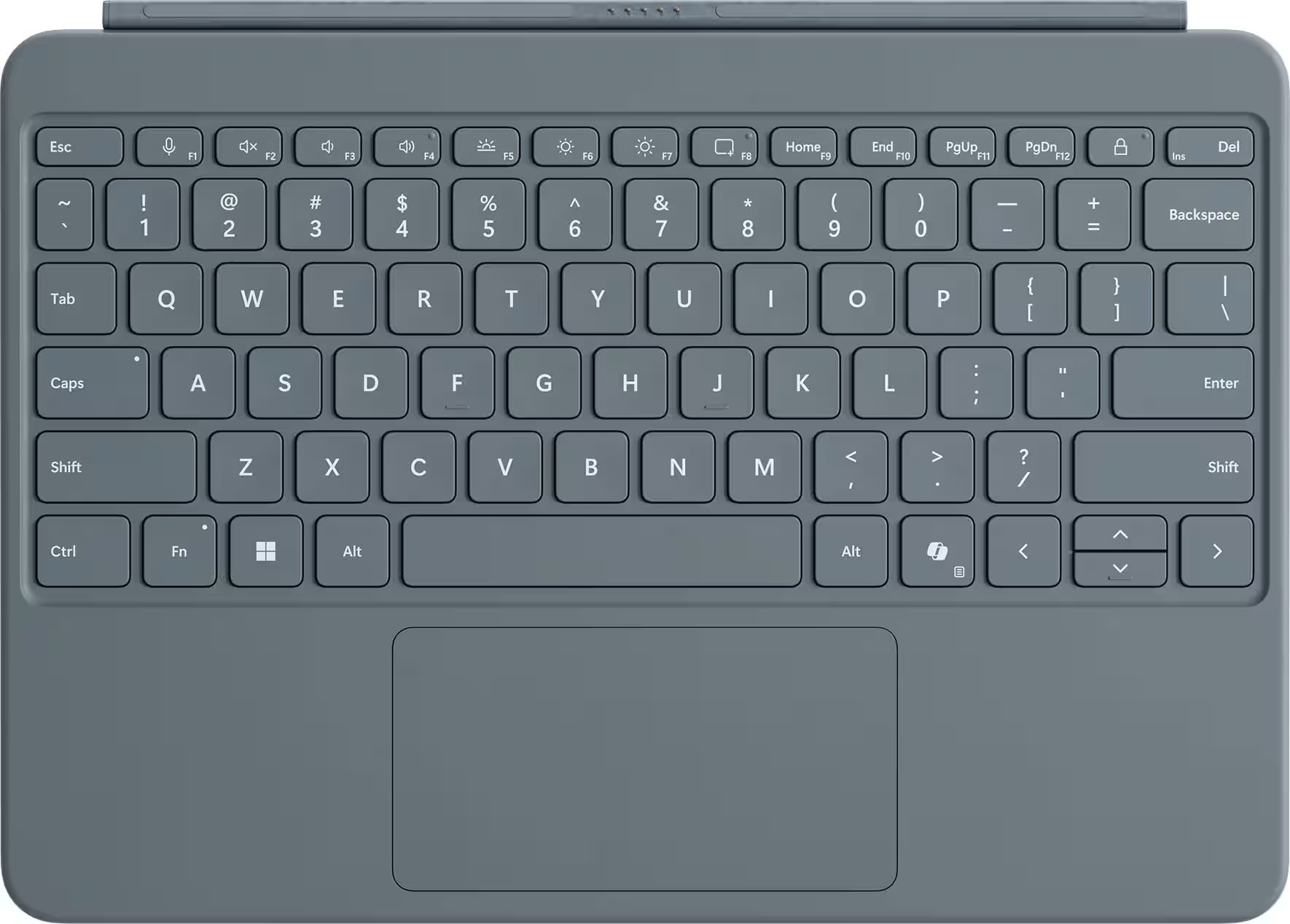
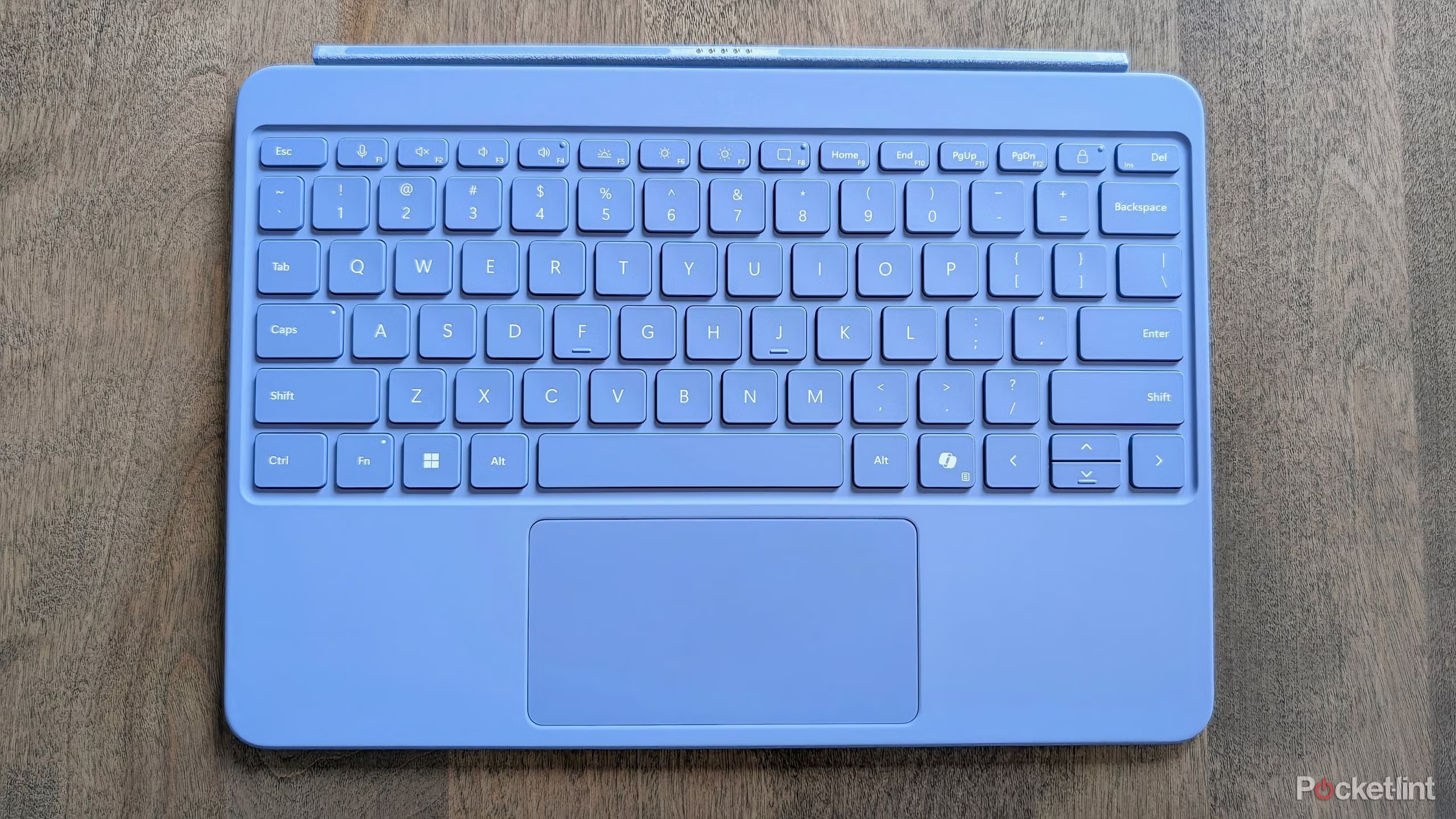
The Surface Pro 12-inch Keyboard features moving mechanical keys designed to provide a comfortable and familiar typing experience. Its full row of F1 through F12 function keys gives users quick access to standard Windows functions, while dedicated keys provide convenient access to Copilot, microphone mute, screen snipping, Windows shortcuts, media controls, screen brightness, and device locking.
The integrated backlighting improves key visibility when working in low-light environments. This makes the keyboard suitable for working at night, during travel, in dimly lit offices, or in other situations where conventional keyboard lettering may be difficult to see.
A dedicated Copilot key is included for quick access to Copilot features on supported Windows configurations. If Copilot is unavailable or disabled on the device, Microsoft states that pressing the Copilot key can instead launch Windows Search.
The keyboard also features a precision touchpad for smooth and accurate pointer control. Users can navigate websites, select files, scroll through documents, operate applications, and use supported gestures without carrying a separate mouse. Microsoft also lists an adaptive touch mode for accessibility on the Surface Pro 12-inch Keyboard.
The dynamic hinge is another important feature of the keyboard. It can flex through 360 degrees, allowing users to find a comfortable position for typing and interacting with the Surface Pro. The hinge is constructed with Alcantara fabric, while the keyboard's palm rest uses a smooth-matte finish designed for everyday use and easy cleaning.
The magnetic connection makes attaching the keyboard straightforward. Users simply bring the bottom edge of the Surface Pro 12-inch close to the top edge of the keyboard until the magnetic connectors click into position. This creates a clean connection without requiring a separate wired keyboard cable.
Once connected, the Surface Pro 12-inch can be used much like a traditional laptop. The physical keyboard is useful for typing documents, emails, reports, school assignments, spreadsheets, presentations, web searches, programming, and other tasks that benefit from a dedicated keyboard.
The Surface Slim Pen 2 adds another input method. Users can write directly on the Surface Pro touchscreen, draw, annotate documents, sketch ideas, highlight information, and interact with supported creative applications. This combination of keyboard, touchpad, touchscreen, and pen provides several ways to interact with the same device.
One notable difference from the larger Surface Pro keyboard accessories is how the Slim Pen is stored and charged. Microsoft states that the Surface Pro 12-inch Keyboard itself does not provide pen storage and charging. Instead, the Surface Pro 12-inch has an integrated Slim Pen storage and wireless charging area on the back of the device.
This means users can keep the Slim Pen 2 securely attached to the rear of the Surface Pro 12-inch when it is not being used. The pen can charge magnetically through the compatible Surface Pro device.
For professionals, the Surface Pro 12-inch Keyboard with Slim Pen provides a flexible mobile workstation. Users can type reports, manage emails, attend online meetings, work with business applications, create presentations, and take handwritten notes without carrying several separate accessories.
The Slim Pen 2 can be especially useful during meetings. Users can write notes directly on the Surface display, annotate documents, mark up presentations, or make quick sketches and diagrams. When typing is required, the keyboard provides a traditional physical typing experience.
For students, this combination can support both typed and handwritten work. Students can use the keyboard for essays, assignments, research, programming, presentations, and online learning, while the Slim Pen can be used for handwritten notes, diagrams, calculations, annotations, and creative projects.
For creative professionals, the pen provides pressure-sensitive input for compatible applications. The 4,096 pressure levels and tilt support can help provide more natural digital writing, drawing, and shading experiences on supported software.
The keyboard is also suitable for remote workers and mobile professionals. The Surface Pro 12-inch itself is designed as a compact 2-in-1 device, and the detachable keyboard allows users to switch between laptop-style productivity and tablet-style touchscreen use.
When typing is required, the keyboard can be attached. When reading, browsing, drawing, or using touch-based applications, the keyboard can be repositioned or detached according to the user's needs.
The keyboard's 360-degree dynamic hinge provides additional flexibility for positioning. Users can adjust the keyboard to find a suitable working posture while using the Surface Pro 12-inch on a desk, table, or other stable surface.The Microsoft Surface Pro 12-inch Keyboard with Slim Pen is a premium detachable keyboard and digital pen bundle designed specifically for the Microsoft Surface Pro 12-inch. It combines a full-size backlit keyboard, precision touchpad, flexible 360-degree dynamic hinge, dedicated Windows and productivity controls, and the Surface Slim Pen 2 to provide a versatile setup for work, study, creativity, note-taking, and everyday computing.
Designed exclusively for the Surface Pro 12-inch, this keyboard attaches magnetically to the device and transforms the tablet into a laptop-style workstation. Microsoft specifically states that the Surface Pro 12-inch is compatible with the Surface Pro 12-inch Keyboard, while keyboards designed for the 13-inch Surface Pro models are not compatible with the 12-inch model.
The bundle includes the Surface Pro 12-inch Keyboard and Surface Slim Pen 2. The Slim Pen 2 provides a precise digital writing and drawing experience, making the bundle suitable for customers who want more than conventional keyboard input. Microsoft specifies 4,096 pressure levels, zero-force inking, tilt support, Bluetooth connectivity, and haptic feedback compatibility for the Surface Slim Pen 2 when used with supported devices and software.
The Surface Pro 12-inch Keyboard features moving mechanical keys designed to provide a comfortable and familiar typing experience. Its full row of F1 through F12 function keys gives users quick access to standard Windows functions, while dedicated keys provide convenient access to Copilot, microphone mute, screen snipping, Windows shortcuts, media controls, screen brightness, and device locking.
The integrated backlighting improves key visibility when working in low-light environments. This makes the keyboard suitable for working at night, during travel, in dimly lit offices, or in other situations where conventional keyboard lettering may be difficult to see.
A dedicated Copilot key is included for quick access to Copilot features on supported Windows configurations. If Copilot is unavailable or disabled on the device, Microsoft states that pressing the Copilot key can instead launch Windows Search.
The keyboard also features a precision touchpad for smooth and accurate pointer control. Users can navigate websites, select files, scroll through documents, operate applications, and use supported gestures without carrying a separate mouse. Microsoft also lists an adaptive touch mode for accessibility on the Surface Pro 12-inch Keyboard.
The dynamic hinge is another important feature of the keyboard. It can flex through 360 degrees, allowing users to find a comfortable position for typing and interacting with the Surface Pro. The hinge is constructed with Alcantara fabric, while the keyboard's palm rest uses a smooth-matte finish designed for everyday use and easy cleaning.
The magnetic connection makes attaching the keyboard straightforward. Users simply bring the bottom edge of the Surface Pro 12-inch close to the top edge of the keyboard until the magnetic connectors click into position. This creates a clean connection without requiring a separate wired keyboard cable.
Once connected, the Surface Pro 12-inch can be used much like a traditional laptop. The physical keyboard is useful for typing documents, emails, reports, school assignments, spreadsheets, presentations, web searches, programming, and other tasks that benefit from a dedicated keyboard.
The Surface Slim Pen 2 adds another input method. Users can write directly on the Surface Pro touchscreen, draw, annotate documents, sketch ideas, highlight information, and interact with supported creative applications. This combination of keyboard, touchpad, touchscreen, and pen provides several ways to interact with the same device.
One notable difference from the larger Surface Pro keyboard accessories is how the Slim Pen is stored and charged. Microsoft states that the Surface Pro 12-inch Keyboard itself does not provide pen storage and charging. Instead, the Surface Pro 12-inch has an integrated Slim Pen storage and wireless charging area on the back of the device.
This means users can keep the Slim Pen 2 securely attached to the rear of the Surface Pro 12-inch when it is not being used. The pen can charge magnetically through the compatible Surface Pro device.
For professionals, the Surface Pro 12-inch Keyboard with Slim Pen provides a flexible mobile workstation. Users can type reports, manage emails, attend online meetings, work with business applications, create presentations, and take handwritten notes without carrying several separate accessories.
The Slim Pen 2 can be especially useful during meetings. Users can write notes directly on the Surface display, annotate documents, mark up presentations, or make quick sketches and diagrams. When typing is required, the keyboard provides a traditional physical typing experience.
For students, this combination can support both typed and handwritten work. Students can use the keyboard for essays, assignments, research, programming, presentations, and online learning, while the Slim Pen can be used for handwritten notes, diagrams, calculations, annotations, and creative projects.
For creative professionals, the pen provides pressure-sensitive input for compatible applications. The 4,096 pressure levels and tilt support can help provide more natural digital writing, drawing, and shading experiences on supported software.
The keyboard is also suitable for remote workers and mobile professionals. The Surface Pro 12-inch itself is designed as a compact 2-in-1 device, and the detachable keyboard allows users to switch between laptop-style productivity and tablet-style touchscreen use.
When typing is required, the keyboard can be attached. When reading, browsing, drawing, or using touch-based applications, the keyboard can be repositioned or detached according to the user's needs.
The keyboard's 360-degree dynamic hinge provides additional flexibility for positioning. Users can adjust the keyboard to find a suitable working posture while using the Surface Pro 12-inch on a desk, table, or other stable surface.