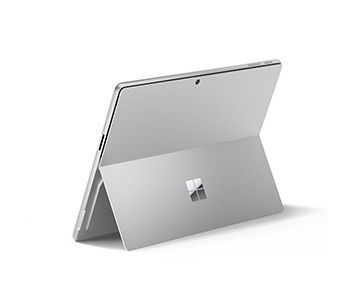
The Microsoft Surface Pro 11th Edition (Model 2076) is a versatile Copilot+ PC that combines the portability of a tablet with the productivity of a full Windows computer. Powered by the Qualcomm Snapdragon X Plus 10-core processor and equipped with 16GB LPDDR5x RAM, a 512GB Gen 4 SSD and Windows 11 Home, this Surface Pro configuration is designed for professionals, students, business users, remote workers, educators and everyday users who want a lightweight and flexible Windows device.
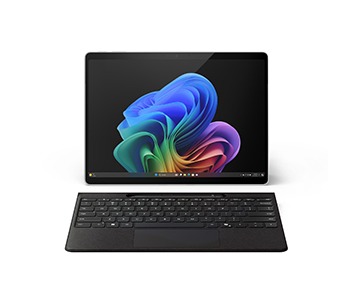
The Surface Pro 11th Edition brings together a compact tablet-style design, a high-resolution touchscreen, a built-in kickstand and support for a detachable keyboard. This allows the device to adapt to different situations. It can be used as a tablet for browsing, reading, note-taking and entertainment, or paired with a compatible Surface Pro Keyboard for a laptop-style productivity setup.
At the centre of this configuration is the Qualcomm Snapdragon X Plus processor. Microsoft specifies the Snapdragon X Plus used in the Surface Pro 11 as a 10-core X1P64100 processor. It is designed to deliver efficient performance for everyday productivity, multitasking, web browsing, communication, document creation, presentations and other compatible Windows workloads.
The Snapdragon X Plus platform also includes a Qualcomm Hexagon Neural Processing Unit capable of up to 45 TOPS, supporting the AI-focused capabilities associated with Microsoft's Copilot+ PC platform. This allows compatible Windows features and applications to take advantage of on-device AI processing.
With 16GB of LPDDR5x RAM, the Surface Pro 11 provides sufficient memory for multitasking across everyday applications. Users can work with multiple browser tabs, Microsoft 365 applications, email, video-conferencing software, cloud services, documents and other compatible programs.
Storage is provided by a 512GB removable Gen 4 solid-state drive. The SSD provides fast access to Windows, applications, documents, photographs, videos, presentations and other files. Microsoft lists the 512GB SSD as one of the available storage configurations for the Snapdragon X Plus Surface Pro 11.
The removable SSD design also provides an advantage for servicing and storage management compared with devices where the internal storage is permanently soldered.
The Surface Pro 11 features a 13-inch PixelSense Flow touchscreen with a 2880 × 1920 resolution and 3:2 aspect ratio. The display provides a detailed workspace for documents, websites, photographs, presentations and other content. Microsoft specifies a dynamic refresh rate of up to 120Hz for the Surface Pro 11 display family.
The 3:2 aspect ratio provides additional vertical workspace compared with many conventional 16:9 laptops. This can be particularly useful when working with documents, websites, spreadsheets and other productivity applications.
The touchscreen supports 10-point multitouch, allowing users to interact naturally with compatible Windows applications. Touch can be used for scrolling, navigation, zooming, drawing, handwriting, annotation and other supported functions.
The Surface Pro 11 can also be paired with a compatible Surface Slim Pen for handwriting, drawing, note-taking and annotation. This makes the device suitable for students, designers, educators, business professionals and other users who benefit from pen input.
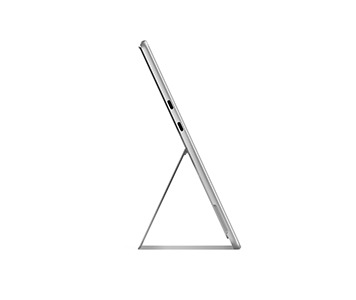
The integrated kickstand allows the Surface Pro to stand independently at different viewing angles. This provides flexibility when typing with a keyboard, watching videos, participating in video calls, displaying presentations or using the touchscreen for drawing and writing.
When paired with a compatible Surface Pro Keyboard, the device can function as a conventional Windows laptop. The keyboard provides a practical setup for writing documents, responding to emails, creating presentations, working with spreadsheets, browsing the web and performing other productivity tasks.
When the keyboard is removed, the Surface Pro becomes a portable Windows tablet.
This 2-in-1 flexibility makes the Surface Pro 11 useful for people who regularly move between offices, classrooms, meetings, home workspaces and other locations.
For business professionals, the Surface Pro 11 can be used for Microsoft 365, email, web-based business platforms, video conferencing, presentations, document management and cloud-based workflows.
Its compact form factor makes it convenient for professionals who travel frequently or move between meetings.
For students, the Surface Pro 11 can support research, online learning, assignments, note-taking, presentations and general academic work. The touchscreen and optional stylus support can also make it useful for handwritten notes and document annotation.
For remote workers, the device provides a compact Windows workstation that can be used at home, in a shared workspace or while travelling.
Windows 11 Home provides the familiar Windows desktop environment and access to a broad ecosystem of compatible applications.
Users can install and use Microsoft 365 applications, web browsers, communication tools, productivity software, cloud-storage applications and other compatible Windows programs.
Because the Snapdragon X Plus is an Arm-based processor, software compatibility should be considered for specialised applications. Windows 11 on Arm supports native Arm applications as well as compatibility technologies for many x86 and x64 applications, but users with specialised software, drivers or peripherals should verify compatibility before purchase.
The Surface Pro 11 is part of Microsoft's Copilot+ PC generation. Its Snapdragon X Plus processor and integrated NPU provide the hardware platform for compatible AI features within Windows and supported applications.
For users interested in modern AI-assisted productivity, the Surface Pro 11 provides access to compatible Copilot+ experiences while retaining the flexibility of a full Windows computer.
The device is also suitable for creative work. When paired with a compatible Surface Slim Pen, users can sketch, draw, annotate documents, write notes and interact with supported creative applications directly on the touchscreen.
For professionals who frequently review or mark up documents, the touchscreen provides an alternative to using only a traditional mouse and keyboard.