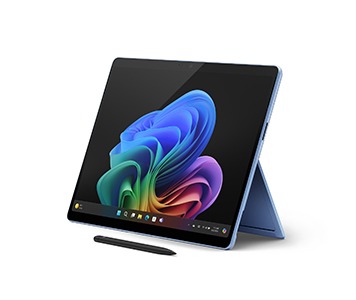
The Microsoft Surface Pro 11th Edition (Model 2076) is a premium 2-in-1 Copilot+ PC designed for users who want the flexibility of a powerful Windows laptop combined with the portability and touchscreen experience of a tablet. Finished in Platinum, this configuration combines the Snapdragon X Elite processor, 16GB RAM, 512GB SSD storage, a high-resolution 13-inch PixelSense Flow touchscreen, and Windows 11 Home to deliver a versatile device for productivity, creativity, communication, entertainment, and everyday computing.
The Surface Pro 11th Edition represents a major step forward in Microsoft's Surface Pro lineup, combining a lightweight tablet-style design with the performance and capabilities of a modern Windows PC. Its detachable keyboard design allows users to switch between tablet and laptop-style workflows depending on the task.
At the centre of this configuration is the Qualcomm Snapdragon X Elite processor. Built for the latest generation of Windows on Arm PCs, Snapdragon X Elite provides a combination of high-performance processing and power efficiency. It is designed to handle demanding productivity applications, multitasking, web browsing, video conferencing, document creation, and a wide range of compatible Windows applications.
The Snapdragon X Elite platform also includes integrated AI capabilities that support Microsoft's Copilot+ PC experience. These capabilities are designed to accelerate compatible AI workloads and provide access to Windows features that take advantage of on-device processing.
With 16GB of RAM, the Surface Pro 11 provides enough memory for demanding everyday multitasking. Users can work with multiple browser tabs, office applications, communication tools, cloud services, documents, and other compatible programs without constantly closing applications to free memory.
The 512GB SSD provides fast solid-state storage for applications, documents, photographs, videos, presentations, projects, and other files. SSD storage also contributes to quick system startup and application loading compared with traditional mechanical hard drives.
The Surface Pro 11 features a 13-inch PixelSense Flow touchscreen designed to provide a responsive and detailed viewing experience. Depending on the configuration, Surface Pro 11 devices are available with high-resolution LCD or OLED display technology; this particular model configuration should be checked against the seller's exact SKU before listing display-specific OLED specifications.
The touchscreen provides a natural way to interact with Windows applications. Users can navigate menus, scroll through documents, browse websites, view photographs, annotate compatible content, and interact with supported applications using touch.
The Surface Pro form factor also makes the device useful for digital note-taking and creative work when paired with a compatible Surface Pen or Surface Slim Pen.
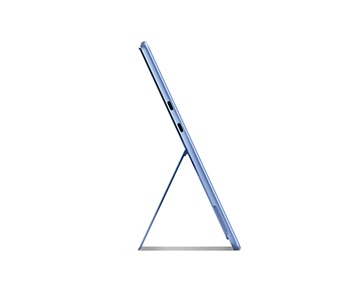
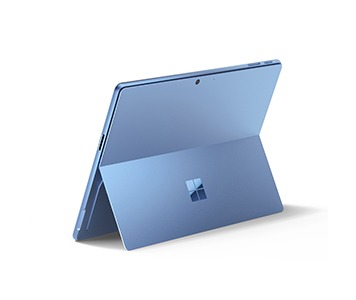
The built-in kickstand allows the tablet to be positioned at different viewing angles. This makes it possible to use the device on a desk or table for typing, drawing, presentations, video calls, or media consumption.
When paired with a compatible Surface Pro keyboard, the device can function as a traditional Windows laptop. The keyboard provides a more conventional typing experience for emails, documents, spreadsheets, reports, web-based work, and other productivity tasks.
When the keyboard is removed, the Surface Pro becomes a portable Windows tablet. This makes it convenient for reading, browsing, note-taking, presentations, media consumption, and touch-based applications.
The detachable design is particularly useful for professionals who move between office, home, meetings, classrooms, and other locations.
For business users, the Surface Pro 11 can be used for Microsoft Office applications, web-based business platforms, email, video conferencing, presentations, document management, cloud services, and multitasking.
The Snapdragon X Elite processor provides the performance required for many everyday professional workloads while maintaining the portability associated with the Surface Pro design.
For students, the device can be used for research, online learning, note-taking, presentations, assignments, document creation, web browsing, and video classes.
Its tablet form factor makes it easy to carry between classrooms, libraries, lecture halls, offices, and home.
For professionals who frequently attend meetings, the Surface Pro 11 provides a flexible platform for video conferencing, presentations, document review, and collaborative work.
The device can also be connected to external displays and compatible peripherals through its available ports and wireless connectivity.
For remote workers, the Surface Pro 11 provides a compact workstation that can be used from a home office, shared workspace, or while travelling.
The Windows 11 Home operating system provides access to the Windows desktop environment and a broad ecosystem of compatible applications.
Users can work with Microsoft 365 applications, web browsers, productivity software, communication applications, cloud-storage services, and other compatible Windows programs.
Because the Snapdragon X Elite platform uses an Arm-based architecture, application compatibility can vary depending on the specific software. Windows 11 on Arm provides native support for many applications and compatibility technologies for many x86 and x64 applications, but specialised software and hardware peripherals should be checked for compatibility before purchase.
The Surface Pro 11 is also designed around Microsoft's Copilot+ PC platform. Compatible AI features can provide additional capabilities within supported Windows applications and services.
The device can be useful for users interested in modern AI-assisted productivity while retaining the flexibility of a full Windows computer.
For creative users, the touchscreen and compatible Surface Pen accessories can support sketching, handwriting, annotation, photo editing, design applications, and other touch-enabled workflows.
The device's compact design also makes it suitable for presentations. Users can detach the keyboard, position the device using the kickstand, and display presentations or other content on its touchscreen.
For media consumption, the high-resolution display can provide a detailed viewing experience for compatible videos, photographs and web content.
The Surface Pro 11 also provides wireless connectivity for compatible networks and Bluetooth accessories, making it possible to connect wireless keyboards, mice, headphones, speakers, and other supported peripherals.
The Platinum finish gives the device a professional appearance suitable for office, education, and personal environments.
WHAT'S IN THE BOX
A Microsoft Surface Pro
A Pen
A Keyboard
A Power Adapter
User Manual