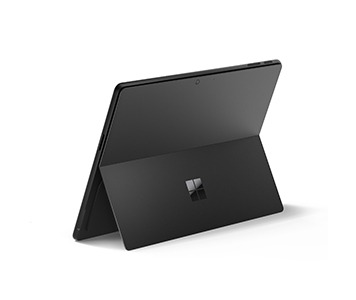
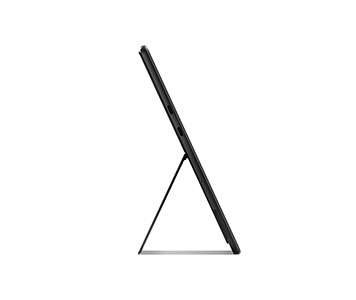
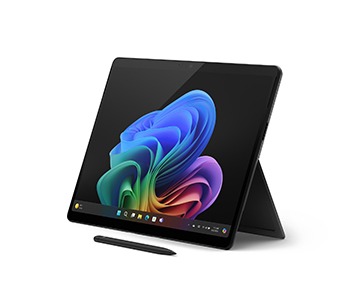
The Microsoft Surface Pro 11th Edition (Model 2076) in Dune is a premium 2-in-1 Copilot+ PC that combines the portability of a tablet with the productivity of a full Windows computer. Powered by the Snapdragon X Elite processor and equipped with 16GB RAM, a 512GB SSD and Windows 11 Home, this Surface Pro configuration is designed for professionals, students, business users, remote workers, creators and everyday users who need a powerful and versatile device in a compact form factor.
The Dune finish gives this Surface Pro a distinctive, modern appearance while maintaining the clean and professional design associated with the Surface Pro family. The device can be used independently as a touchscreen tablet or paired with a compatible Surface Pro Keyboard to create a traditional laptop-style workstation.
At the centre of the Surface Pro 11 is the Qualcomm Snapdragon X Elite processor. This next-generation Arm-based processor is designed to provide strong performance while maintaining power efficiency in a thin and portable Windows device.
The Snapdragon X Elite platform is suitable for everyday productivity, multitasking, web browsing, video conferencing, document creation, presentations, cloud applications, media consumption and many other computing tasks.
The processor also provides the foundation for Microsoft's Copilot+ PC capabilities. Compatible AI features can take advantage of on-device processing to support supported Windows experiences and applications.
With 16GB of RAM, the Surface Pro 11 is equipped for multitasking across multiple applications. Users can work with browser tabs, Microsoft 365 applications, email, communication platforms, cloud services, documents and other compatible software without needing to constantly close applications.
The 512GB SSD provides fast solid-state storage for Windows, applications, documents, photographs, videos, presentations, projects and other files. Solid-state storage also contributes to fast startup times and responsive application loading.
The Surface Pro 11 features a 13-inch PixelSense Flow touchscreen designed for detailed and responsive interaction. The Surface Pro 11 family is available with different display configurations depending on the exact SKU, so display-specific features should be verified against the device's complete manufacturer part number before listing.
The touchscreen allows users to navigate Windows naturally using touch. It can be used for browsing websites, scrolling through documents, viewing photographs, annotating supported content and interacting with compatible applications.
When paired with a compatible Surface Slim Pen, the touchscreen can also be used for handwriting, sketching, drawing, note-taking, annotation and other pen-enabled tasks.
The built-in kickstand is an important part of the Surface Pro design. It allows the device to be positioned at a comfortable viewing angle on a desk or table.
The kickstand can be used for typing with the detachable keyboard, watching videos, making video calls, displaying presentations or using the Surface Pro as a drawing and writing device.
The detachable keyboard system provides another level of flexibility. With a compatible Surface Pro Keyboard attached, the device functions similarly to a conventional laptop.
Users can type documents, respond to emails, work with spreadsheets, browse the internet, create presentations and perform other productivity tasks.
Removing the keyboard transforms the Surface Pro into a tablet-style Windows device.
This flexibility makes the Surface Pro 11 particularly useful for people who move frequently between different working environments.
For business professionals, the Surface Pro 11 can serve as a portable workstation for Microsoft 365, email, video conferencing, business applications, presentations and cloud-based productivity.
Its compact design makes it suitable for employees who regularly move between meetings, offices, client locations and home.
For students, the Surface Pro 11 can be used for research, assignments, online learning, note-taking, presentations, document creation and general academic work.
The touchscreen and optional stylus support can also make it convenient for handwritten notes and annotations.
For remote workers, the Surface Pro 11 can function as a compact home-office computer while also being easy to carry when working from another location.
The Windows 11 Home operating system provides access to the familiar Windows desktop environment and a broad selection of compatible applications.
Users can run Microsoft 365 applications, web browsers, communication software, cloud services, productivity tools and many other Windows applications.
Because Snapdragon X Elite uses an Arm architecture, application compatibility should be considered for specialised software. Windows 11 on Arm supports many native applications as well as compatibility technologies for many x86 and x64 applications, but individual software and hardware peripherals should be checked where compatibility is critical.
The Surface Pro 11 is part of Microsoft's Copilot+ PC generation, providing access to compatible AI-powered Windows features.
For users interested in AI-assisted productivity, this provides additional capabilities while retaining the flexibility of a traditional Windows computer.
The Surface Pro 11 can also be used for creative workflows. With a compatible Surface Slim Pen, users can draw, sketch, annotate documents, write notes and interact with supported creative applications directly on the touchscreen.
For designers, students, architects and other users who benefit from pen input, the combination of touchscreen and stylus support provides an alternative to conventional mouse-and-keyboard interaction.
For presentations, the Surface Pro can be used independently or connected to compatible external displays and accessories.
The kickstand allows the device to stand upright, making it convenient for presenting slides, viewing content or participating in video calls.
Wireless connectivity also allows compatible keyboards, mice, headphones, speakers and other Bluetooth accessories to be connected without additional cables.
The Dune finish provides a distinctive appearance while maintaining the minimalist design associated with Microsoft's Surface hardware.
The portable form factor is particularly useful for users who want one device that can function as both a laptop and a tablet.
Instead of carrying separate devices for productivity and tablet-style use, users can detach the keyboard whenever they need a lighter touchscreen configuration.
When more traditional computing is required, the keyboard can be attached again.
The combination of Snapdragon X Elite, 16GB RAM and 512GB SSD provides a capable configuration for everyday professional and personal computing.
The Snapdragon X Elite is designed to provide strong processing performance while maintaining the power efficiency needed for a thin portable device.
The 16GB memory capacity provides room for multitasking, while the 512GB SSD provides fast storage for applications and files.
For business organisations, the Surface Pro 11 can be deployed to employees who require portable Windows computers for meetings, presentations, communication and productivity.
WHAT'S IN THE BOX
A Microsoft Surface Pro
A Power Adapter
A Keyboard
A Pen
User Manual